 SpringDesk
Your Windows 11 desktop,
sorted.
SpringDesk gathers your icons into translucent boxes that snap into place, sorts new files by type, and lets you preview or find anything without opening a window.

 Free 7-day trial · Buy once, no subscription
Boxes that stay out of your way
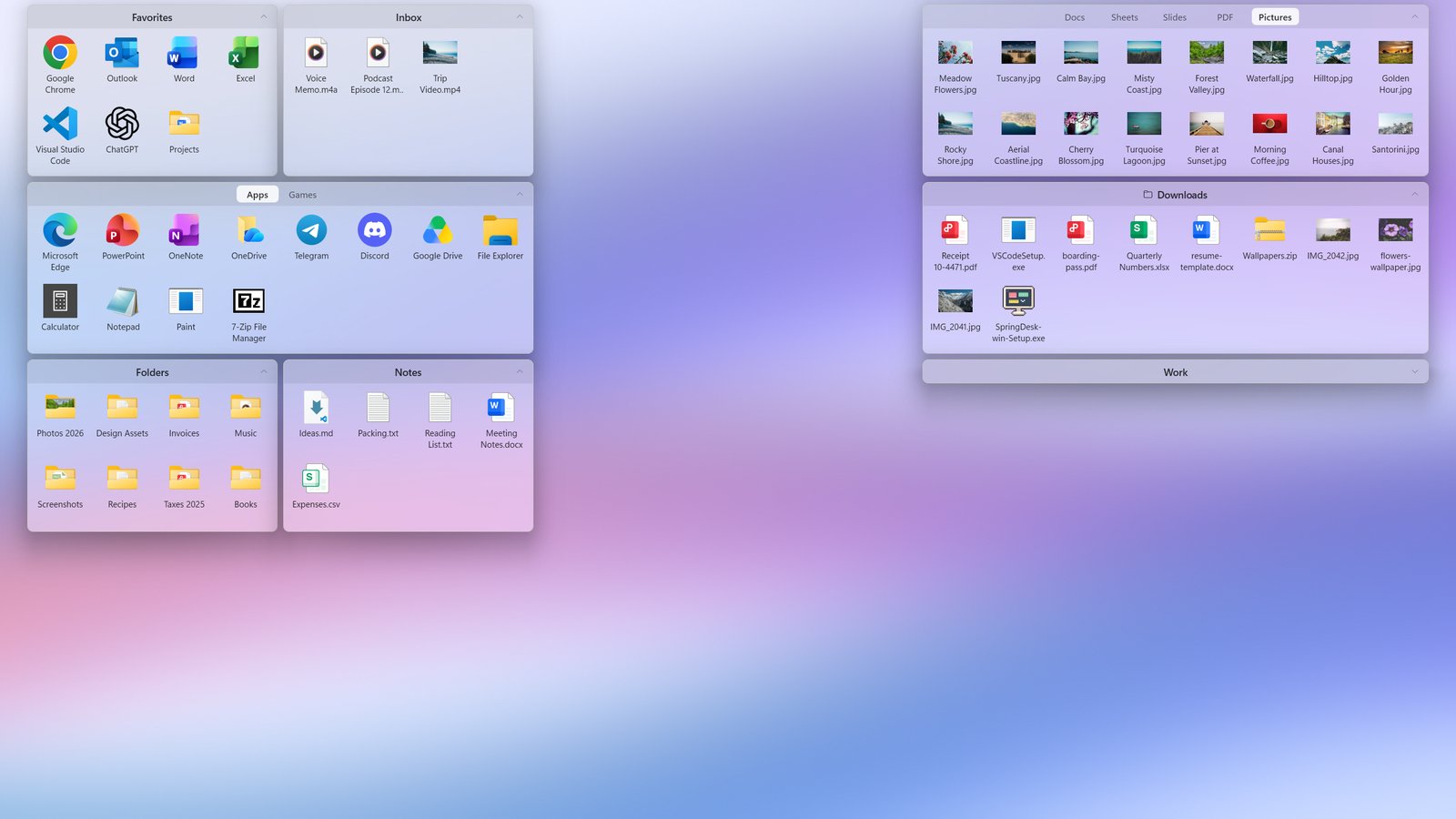
Your icons live in translucent boxes right on the wallpaper, below every window. Drag an icon in and the others make room. Boxes snap to a grid and never overlap, so the desktop stays neat however you move things around.
Tabs, and boxes that roll up
Drop one box onto another to keep more in one place, and switch with a click. Roll a box up to just its title bar when you need the space, and lock your layout so nothing moves by accident.
New files sort themselves
Save or download a file to the desktop and it goes straight to its tab: documents, spreadsheets, slides, PDFs, pictures and more. Anything SpringDesk can't place waits in the Inbox, so nothing goes missing.
Press Space to look inside
Pictures, videos, music, text, code and PDFs open in an instant, without starting another app. The arrow keys flip through the rest. Other files show their details at a glance.
Just start typing
Click the desktop and type, or press Ctrl+Alt+Space from anywhere. Search finds what's in every box and tab, including the folders you show on your desktop.
Light or dark, clear or frosted
SpringDesk follows Windows' light and dark mode. Pick clear glass, or frosted glass that turns even a busy wallpaper into soft colour behind your icons. It follows live wallpapers too.
Works like Windows
Double-click to open, the usual right-click menu, drag and drop, cut, copy, paste, F2 to rename.
Never loses your layout
A separate layout for each resolution and scaling, and a daily backup you can go back to.
Your files stay put
SpringDesk only shows your desktop in order. Nothing is moved or deleted.
Private by design
No account, no ads, no data collected. It all happens on your PC.
Questions
How much is it?
Try SpringDesk free for 7 days. After that it's a single purchase in the Microsoft Store: no subscription, and updates come with it. The Store shows the price in your currency.
Does SpringDesk move my files?
No. Your files stay in your Desktop folder; SpringDesk only shows them in boxes. Uninstall it and your desktop is exactly as it was.
Does it work on Windows 10?
No, SpringDesk needs Windows 11.
I use another desktop organizer. Can I switch?
Yes. Quit the other organizer, start SpringDesk, and it sorts your desktop into boxes on its first run. You can rearrange everything from there.
Is it in my language?
SpringDesk is in English and Chinese, and follows your Windows display language.
Something isn't working.
Open Settings › About › Export diagnostics and open an issue with the zip. It holds logs and your layout, with file names but no file contents.
Give your desktop some room.
Free 7-day trial · Windows 11